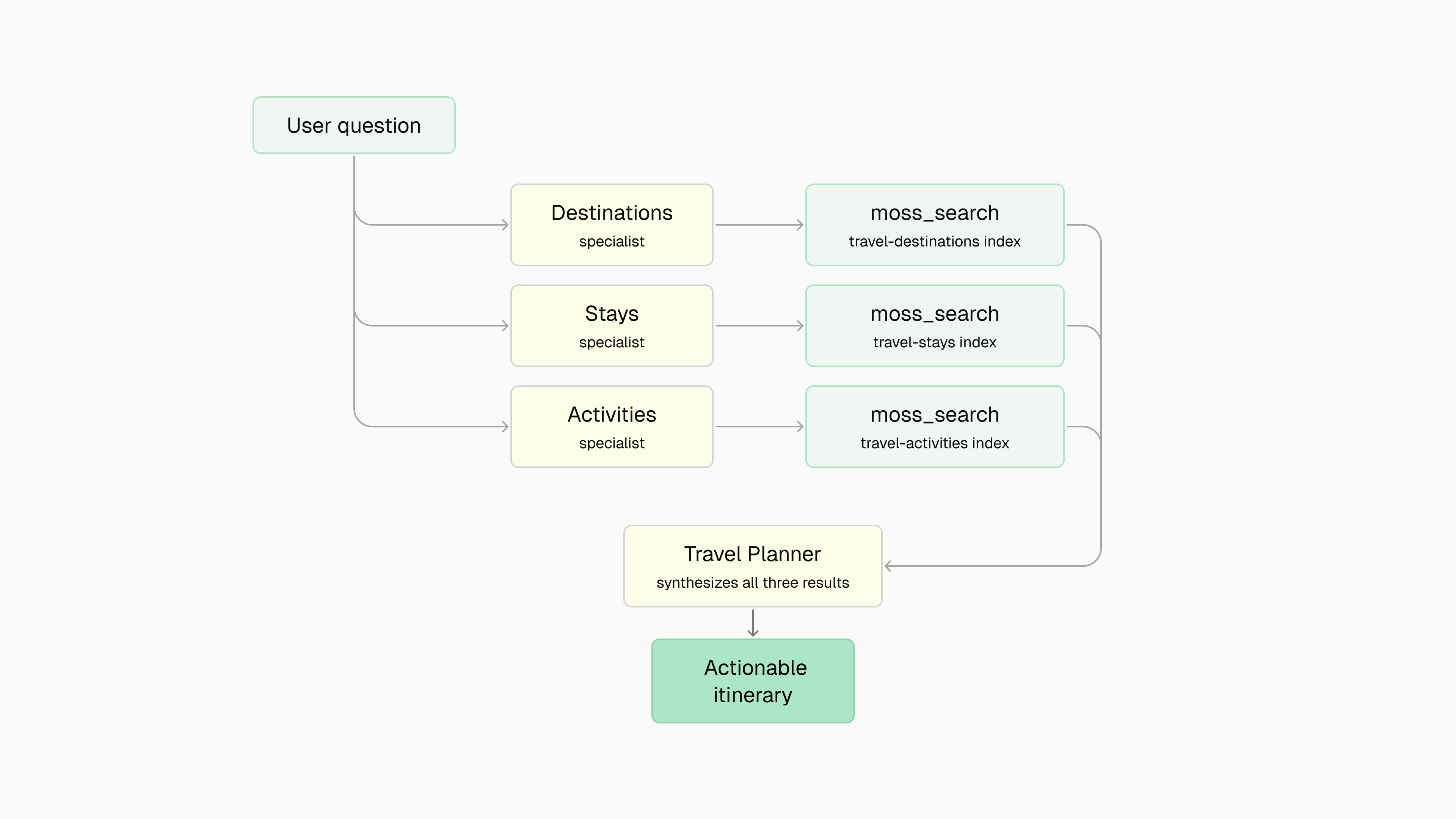
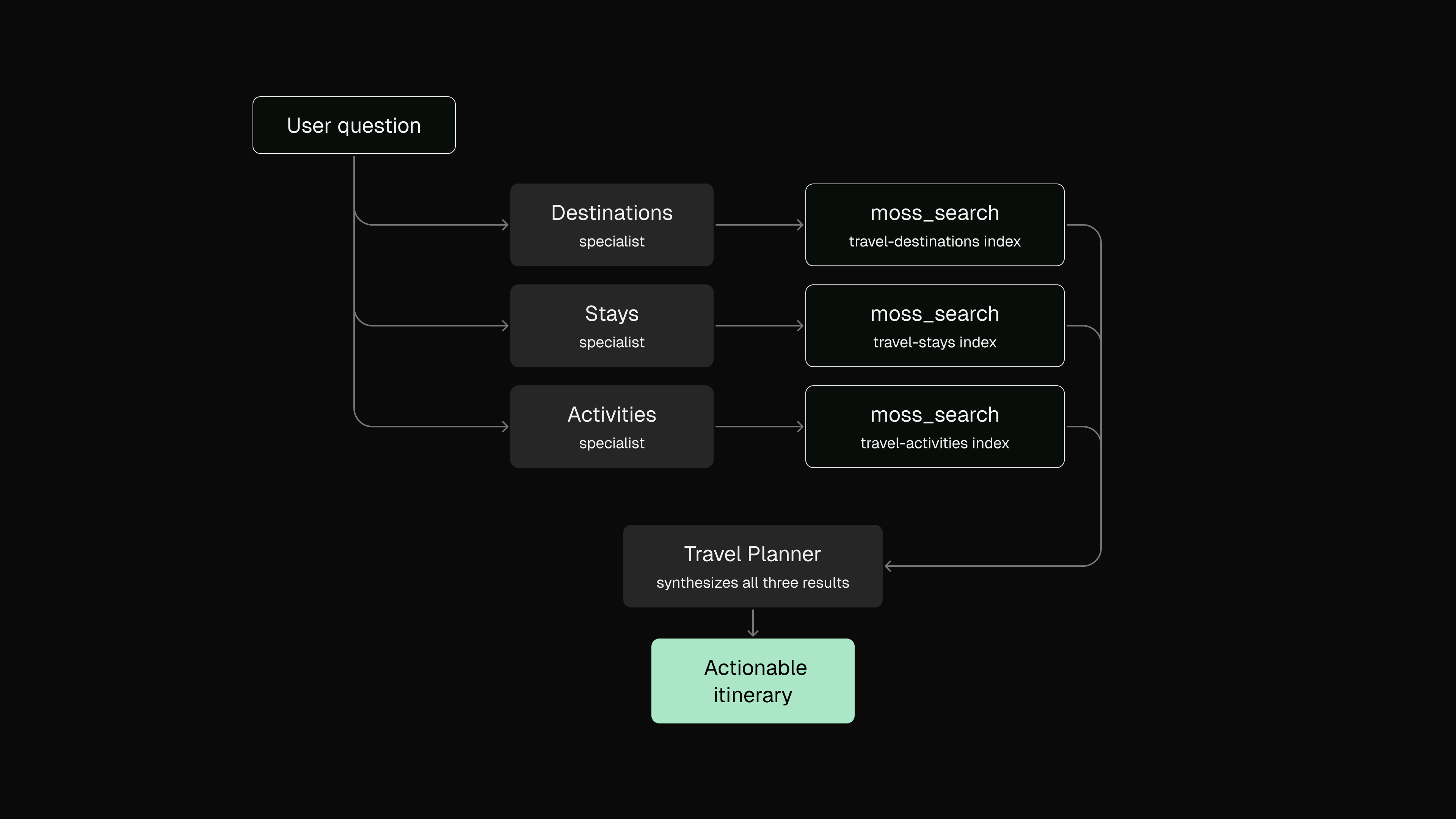
Use Moss with CrewAI to give each agent in your crew access to a dedicated semantic search index. Domain isolation keeps retrieval focused — your destinations agent only sees destination guides, your stays agent only sees accommodations — so the planner agent receives clean, relevant context to synthesize from.
Full example — see the CrewAI cookbook for the complete runnable demo with travel data, interactive chat, and all 8 Moss tools (search, add/delete/get docs, create/delete/get/list indexes).

Why use Moss with CrewAI?

CrewAI assigns roles and tools to each agent in a crew. Moss fits naturally as a per-agent tool: each specialist gets its own MossSearchTool pointing at a domain-specific index, so retrieval is both fast and scoped. Sub-10ms queries mean Moss never introduces noticeable latency into the crew’s task execution.

Required tools

  • Moss account with project credentials
  • Google Gemini API key (or swap in any CrewAI-compatible LLM)
  • Python 3.11+

Integration guide

1

Installation

pip install "crewai[google-genai]" moss python-dotenv
2

Environment setup

.env
MOSS_PROJECT_ID=your-project-id
MOSS_PROJECT_KEY=your-project-key
GEMINI_API_KEY=your-gemini-api-key
3

Create MossSearchTool

MossSearchTool extends crewai.tools.BaseTool. The index is loaded lazily on first use — just pass the MossClient and the index name.
import asyncio
from crewai.tools import BaseTool
from moss import MossClient, QueryOptions
from pydantic import BaseModel, Field, PrivateAttr

class MossSearchInput(BaseModel):
    query: str = Field(description="The search query")

class MossSearchTool(BaseTool):
    name: str = "moss_search"
    description: str = (
        "Semantic search over a Moss knowledge base. "
        "Returns the most relevant documents for a given query."
    )
    args_schema: type[BaseModel] = MossSearchInput

    index_name: str
    top_k: int = 5
    alpha: float = 0.8

    _client: MossClient = PrivateAttr()
    _loaded: bool = PrivateAttr(default=False)

    def __init__(self, client: MossClient, **kwargs):
        super().__init__(**kwargs)
        self._client = client

    def _run(self, query: str) -> str:
        return asyncio.run(self._arun(query))

    async def _arun(self, query: str) -> str:
        if not self._loaded:
            await self._client.load_index(self.index_name)
            self._loaded = True
        results = await self._client.query(
            self.index_name,
            query,
            QueryOptions(top_k=self.top_k, alpha=self.alpha),
        )
        if not results.docs:
            return "No relevant information found."
        return "\n\n".join(
            f"Result {i+1} (score: {doc.score:.2f}):\n{doc.text}"
            for i, doc in enumerate(results.docs)
        )
4

Set up domain-isolated indexes

Each specialist agent gets its own Moss index. This keeps retrieval scoped — a query for “budget hotels” only hits the stays index, not destinations or activities.
import asyncio
from moss import DocumentInfo, MossClient

async def setup_indexes(client: MossClient):
    indexes = {
        "travel-destinations": [
            DocumentInfo(id="dest-1", text="Tokyo: best visited in spring or autumn..."),
            DocumentInfo(id="dest-2", text="Portugal: budget-friendly in the Alentejo region..."),
            # more documents
        ],
        "travel-stays": [
            DocumentInfo(id="stay-1", text="Capsule Hotel Shinjuku: ¥3,500/night, central location..."),
            # more documents
        ],
        "travel-activities": [
            DocumentInfo(id="act-1", text="Fushimi Inari hike: free, 2-3 hours, stunning views..."),
            # more documents
        ],
    }

    for index_name, docs in indexes.items():
        try:
            await client.create_index(index_name, docs)
        except RuntimeError as e:
            if "already exists" not in str(e):
                raise
        await client.load_index(index_name)
5

Build the crew

Each specialist agent receives a MossSearchTool bound to its domain index. The planner agent synthesizes their findings without needing direct search access.
from crewai import LLM, Agent, Crew, Task
from moss import MossClient

client = MossClient("your-project-id", "your-project-key")
llm = LLM(model="gemini/gemini-2.5-flash", api_key="your-gemini-key")

destinations_agent = Agent(
    role="Destinations Specialist",
    goal="Find destination guides, budget tips, and local travel advice",
    backstory="You are a travel destination expert. Always use the moss_search tool and return all results.",
    tools=[MossSearchTool(client=client, index_name="travel-destinations", top_k=5)],
    llm=llm,
)

stays_agent = Agent(
    role="Hotels & Stays Specialist",
    goal="Find accommodation options with pricing and amenities",
    backstory="You are an accommodation expert. Always use the moss_search tool and return all results.",
    tools=[MossSearchTool(client=client, index_name="travel-stays", top_k=5)],
    llm=llm,
)

activities_agent = Agent(
    role="Activities & Tours Specialist",
    goal="Find tours, activities, and experiences with costs",
    backstory="You are an activities expert. Always use the moss_search tool and return all results.",
    tools=[MossSearchTool(client=client, index_name="travel-activities", top_k=5)],
    llm=llm,
)

planner_agent = Agent(
    role="Travel Planner",
    goal="Create helpful travel plans from specialist findings",
    backstory=(
        "You are an experienced travel planner. Use specialist findings to craft "
        "a clear, actionable travel plan. Never make up information."
    ),
    llm=llm,
)
6

Run a query

Each specialist runs a search task in parallel. The planner task uses their results as context to produce the final itinerary.
question = "Budget trip to Southeast Asia for 2 weeks"

search_tasks = [
    Task(
        description=f"Use moss_search to find: '{question}'. Return ALL results as-is.",
        expected_output="Raw search results from the knowledge base.",
        agent=agent,
    )
    for agent in [destinations_agent, stays_agent, activities_agent]
]

plan_task = Task(
    description=(
        f"A traveler asks: '{question}'\n\n"
        "Create a helpful travel plan using the specialist findings. "
        "Include specific recommendations with prices where available."
    ),
    expected_output="A friendly, actionable travel plan.",
    agent=planner_agent,
    context=search_tasks,
)

crew = Crew(
    agents=[destinations_agent, stays_agent, activities_agent, planner_agent],
    tasks=search_tasks + [plan_task],
)

asyncio.run(setup_indexes(client))
result = crew.kickoff()
print(result)

How it works

User question

      ├──▶  Destinations Specialist  ──▶  moss_search (travel-destinations index)

      ├──▶  Stays Specialist          ──▶  moss_search (travel-stays index)

      ├──▶  Activities Specialist     ──▶  moss_search (travel-activities index)

      └──▶  Travel Planner  ◀──  synthesizes all three results


          Actionable itinerary
Each index is loaded into local memory once. All subsequent moss_search calls within the crew execution hit the in-memory path for consistent sub-10ms retrieval.